CSV cleanup for Shopify

Clean up messy supplier CSVs for Shopify import without rebuilding the file

This workflow starts with a supplier spreadsheet that mixes music and apparel products, inconsistent titles, supplier-specific columns, quantity formats, image references, and even an invalid barcode. Catalog Intake reformats the supplier data into reviewed Shopify draft or active products and inventory updates before anything is pushed.

CSV cleanup workflow

From messy supplier spreadsheet to reviewed Shopify products

This example follows a real CSV cleanup workflow: upload the original supplier file, normalize and reformat the bad supplier data, review the invalid barcode warning, approve the rows, then push draft products, active products, or inventory updates to Shopify.

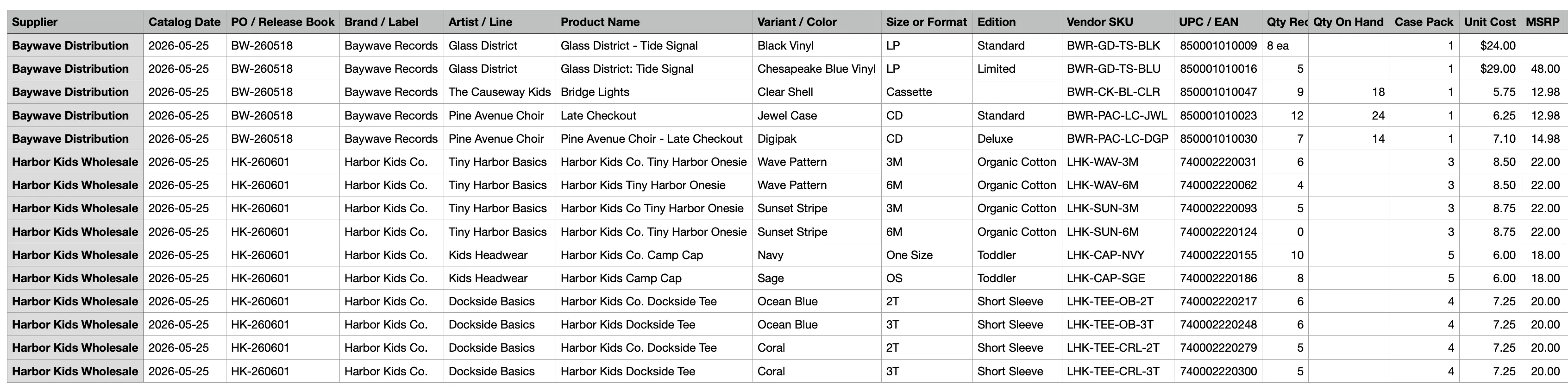
Messy vendor CSV with supplier, brand, product, variant, UPC, quantity, unit cost, MSRP, image, and notes columns.

1. Start with the messy supplier CSV

The Baywave file is not a Shopify template. It mixes supplier operations fields, brand and artist data, product names, variant columns, UPC/EAN values, received quantities, costs, MSRP, image filenames, and row notes.

  • Product names vary across rows, including hyphen and colon versions of the same record.
  • Quantities mix plain numbers, blanks, and values like 8 ea.
  • Cost, retail, and MSRP are inconsistent, with blank fields and currency formatting.
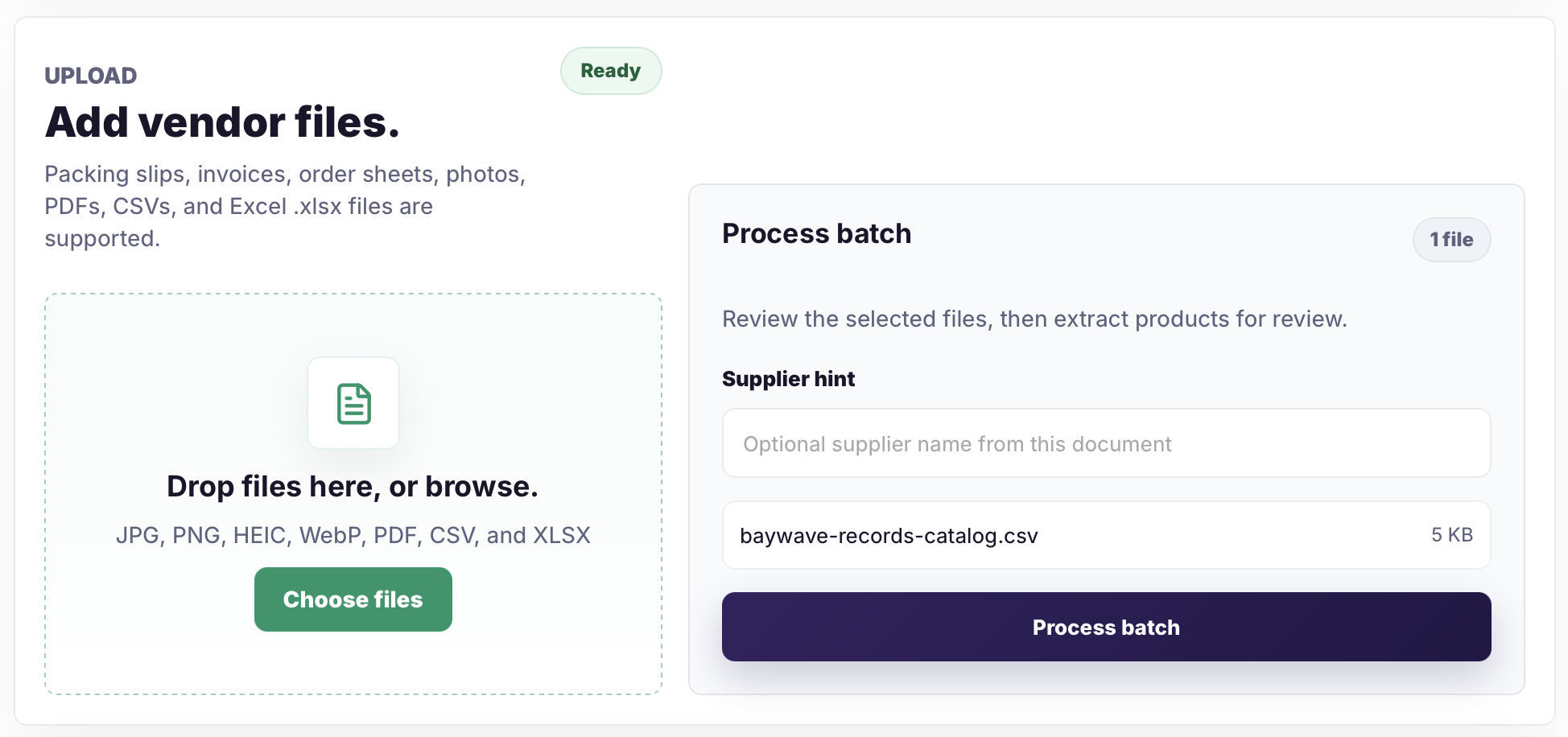
Catalog Intake upload screen with baywave-records-catalog.csv selected for processing.

2. Upload the vendor file as-is

Catalog Intake accepts the CSV directly, so the merchant does not need to rename columns, rebuild handles, or split the sheet into separate product imports first.

  • One uploaded file produced 14 extracted rows.
  • The batch stays in review until rows are approved.
  • Image auto-match is enabled so Shopify Files images can be suggested.
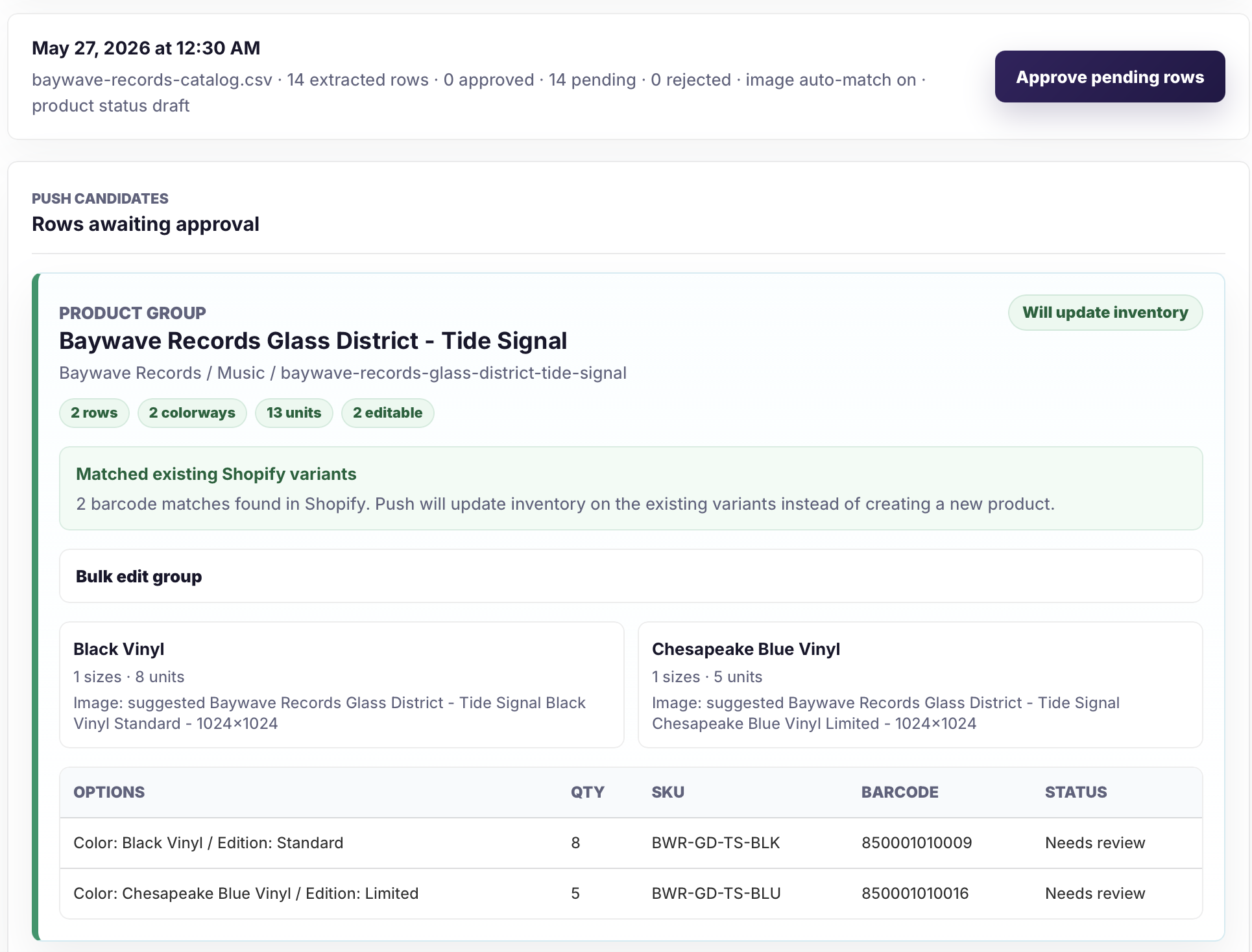
Catalog Intake review screen showing grouped product rows and existing Shopify variant matches.

3. Normalize rows into Shopify product groups

Catalog Intake separates supplier data from Shopify product data, groups variants under the right product, matches existing variants by barcode, and shows whether each group creates a draft product or updates inventory.

  • Tide Signal rows become one product with Black Vinyl and Chesapeake Blue Vinyl variants.
  • Existing Shopify barcodes are matched, so push updates inventory instead of creating duplicates.
  • Image suggestions are shown per colorway before approval.
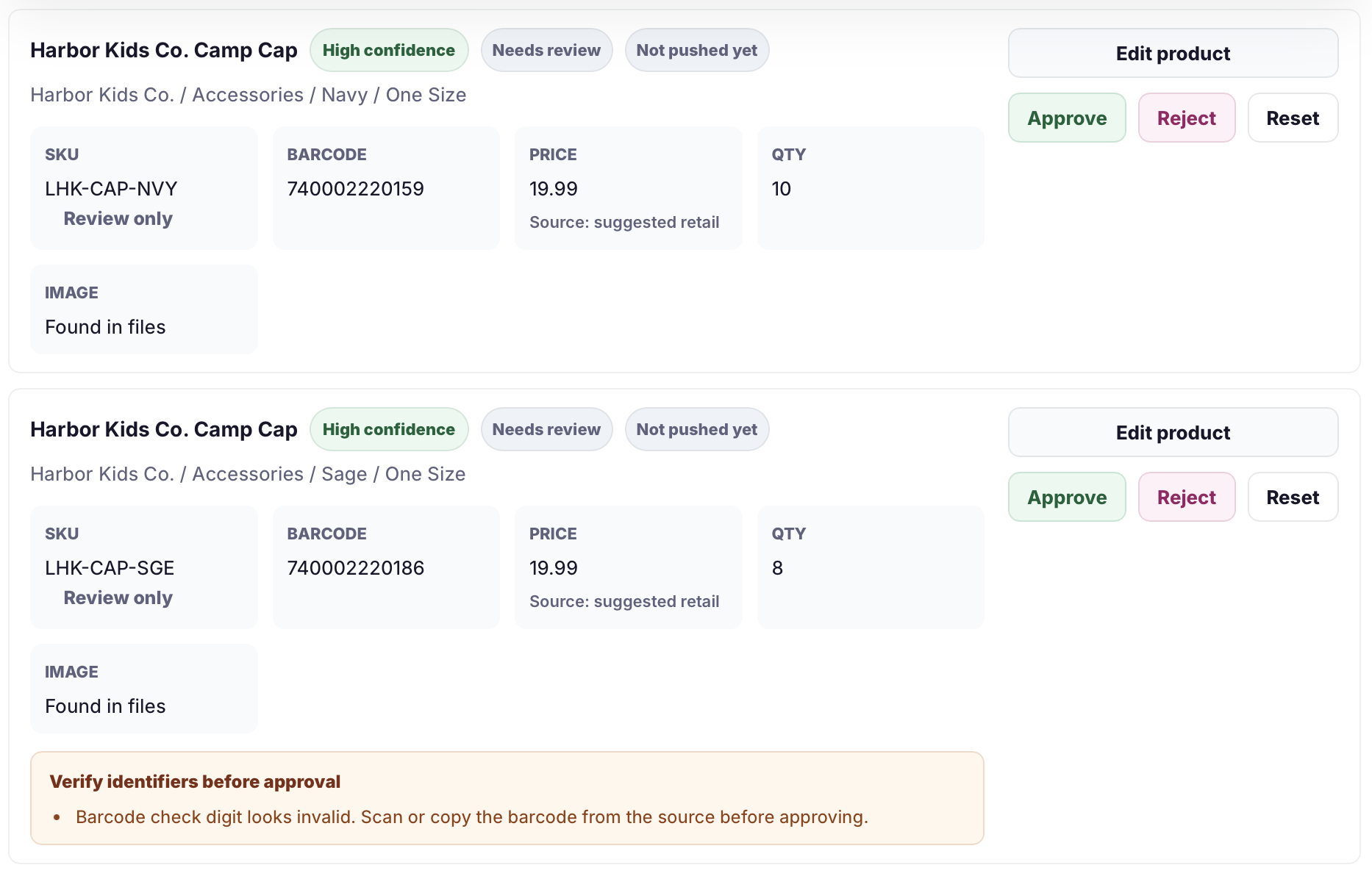
Catalog Intake review screen warning that a barcode check digit looks invalid.

4. Catch risky identifiers before approval

The review screen validates identifiers and calls out rows that need a second look. In this CSV, one barcode failed its check digit validation and was flagged before approval.

  • Invalid UPC/EAN values are visible instead of hidden in the import.
  • The merchant can edit, reset, approve, or reject the row.
  • One suspect barcode does not prevent review of the rest of the batch.
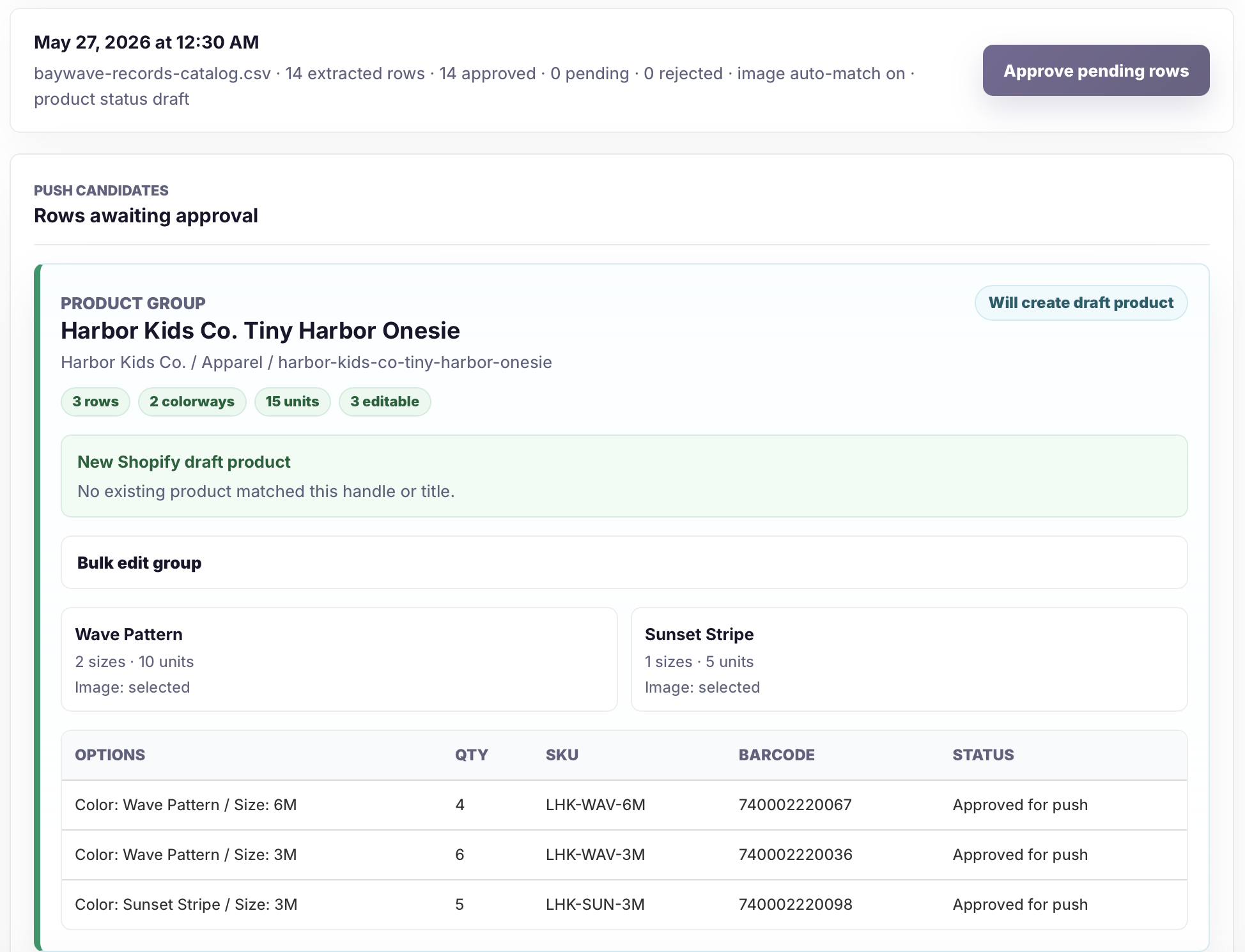
Catalog Intake review screen after rows have been approved for push.

5. Approve reviewed rows, variants, images, and inventory

After review, pending rows become approved rows. The grouped product view keeps SKUs, barcodes, quantities, image status, and push readiness visible before Shopify is touched.

  • The batch moves from 14 pending rows to 14 approved rows.
  • New Harbor Kids products are staged as Shopify drafts.
  • Baywave products with existing barcode matches are staged as inventory updates.
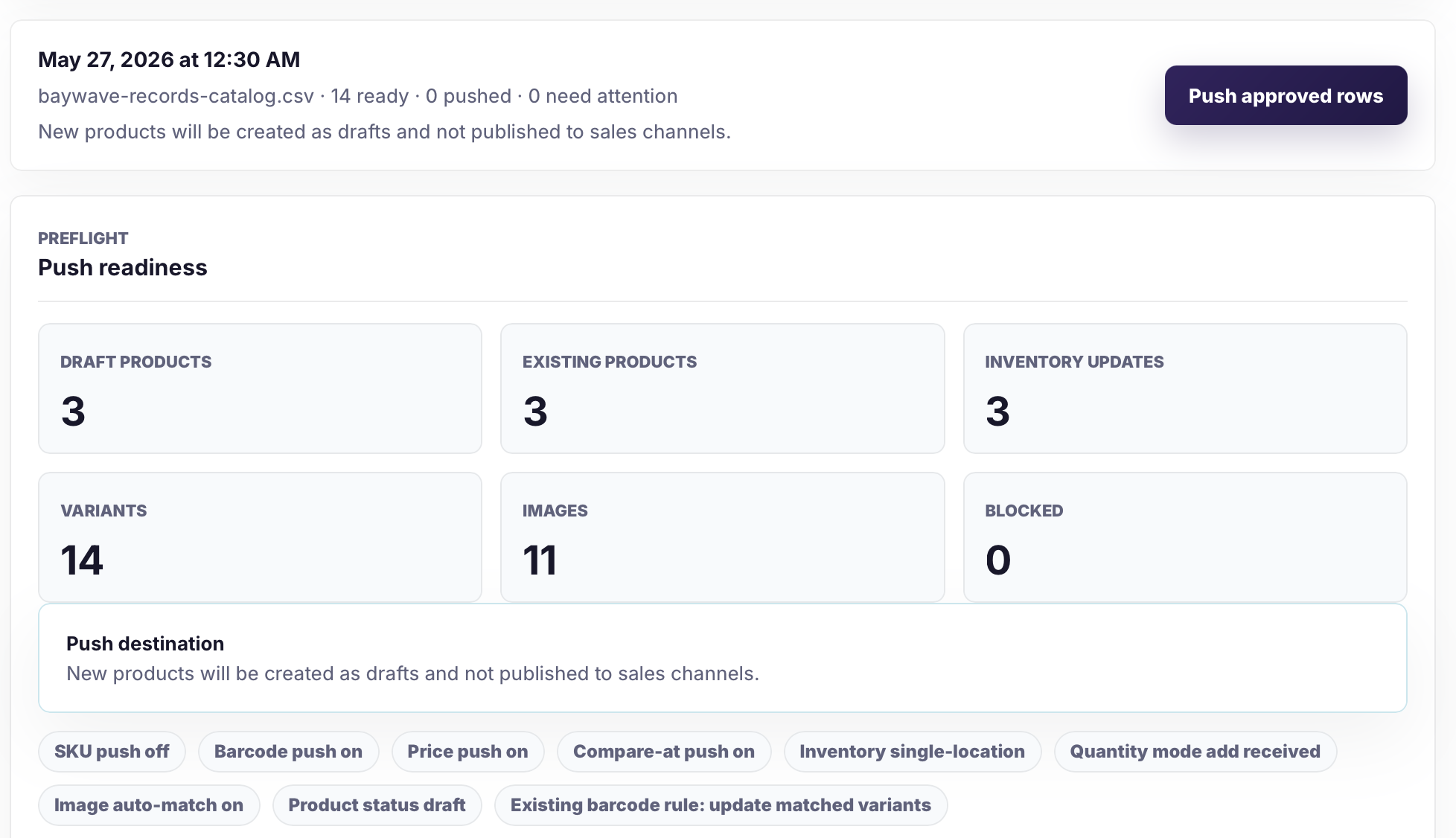
Catalog Intake push readiness screen showing draft products, existing products, inventory updates, variants, images, and blocked rows.

6. Confirm the Shopify push destination

Before push, Catalog Intake summarizes draft products, existing products, inventory updates, variants, images, blocked rows, product status, barcode behavior, and quantity mode.

  • 3 draft products, 3 existing products, and 3 inventory update groups are ready.
  • 14 variants and 11 images are included in the readiness check.
  • Quantity mode is add received, so imported units add to current stock.
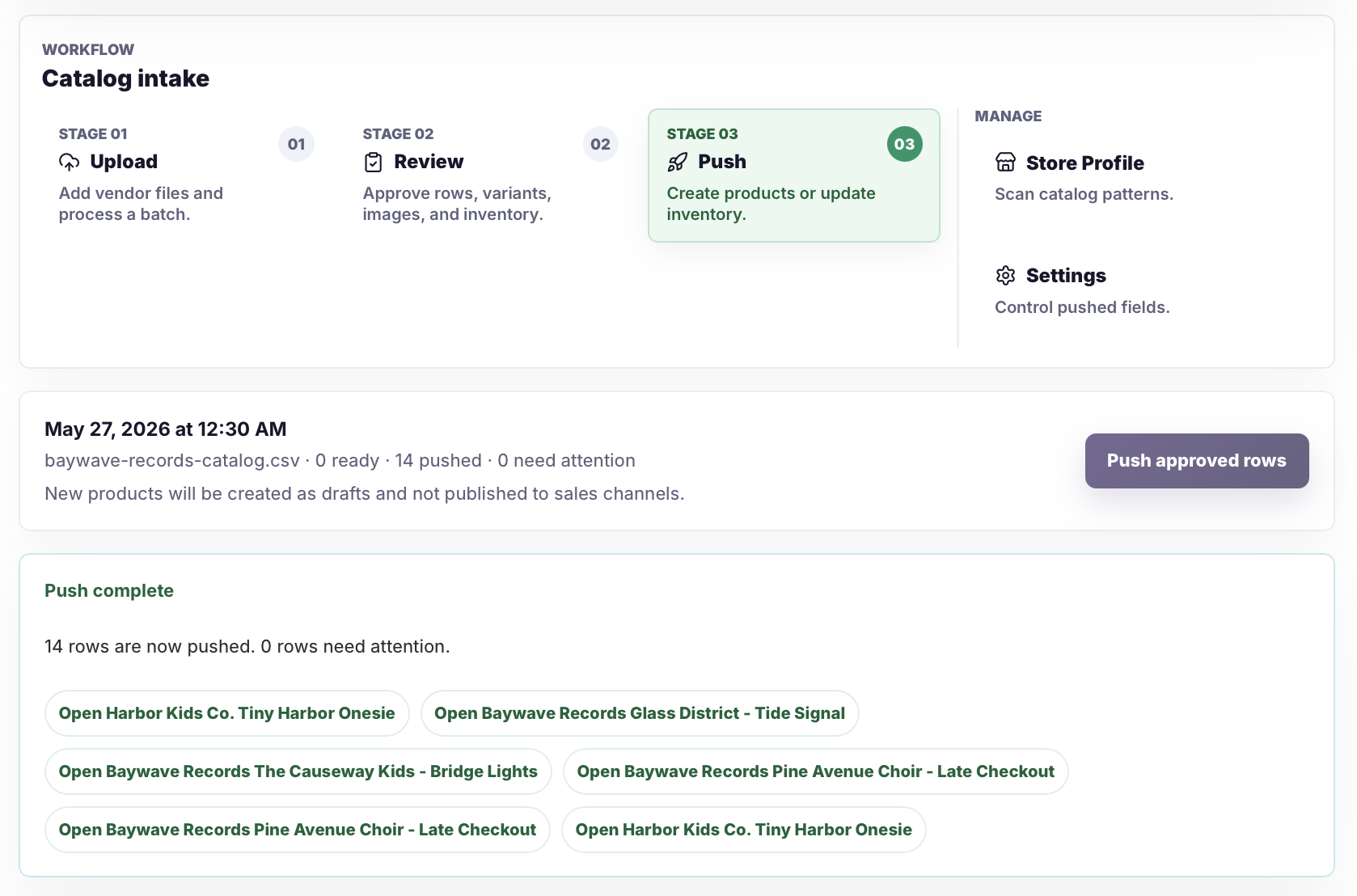
Catalog Intake push complete screen showing 14 rows pushed with no rows needing attention.

7. Push approved rows to Shopify

The final push creates approved draft products and updates matched existing variants. New products remain drafts, while barcode-matched rows add received inventory to current Shopify stock.

  • 14 rows were pushed and 0 rows needed attention.
  • New products were created as drafts, not published to sales channels.
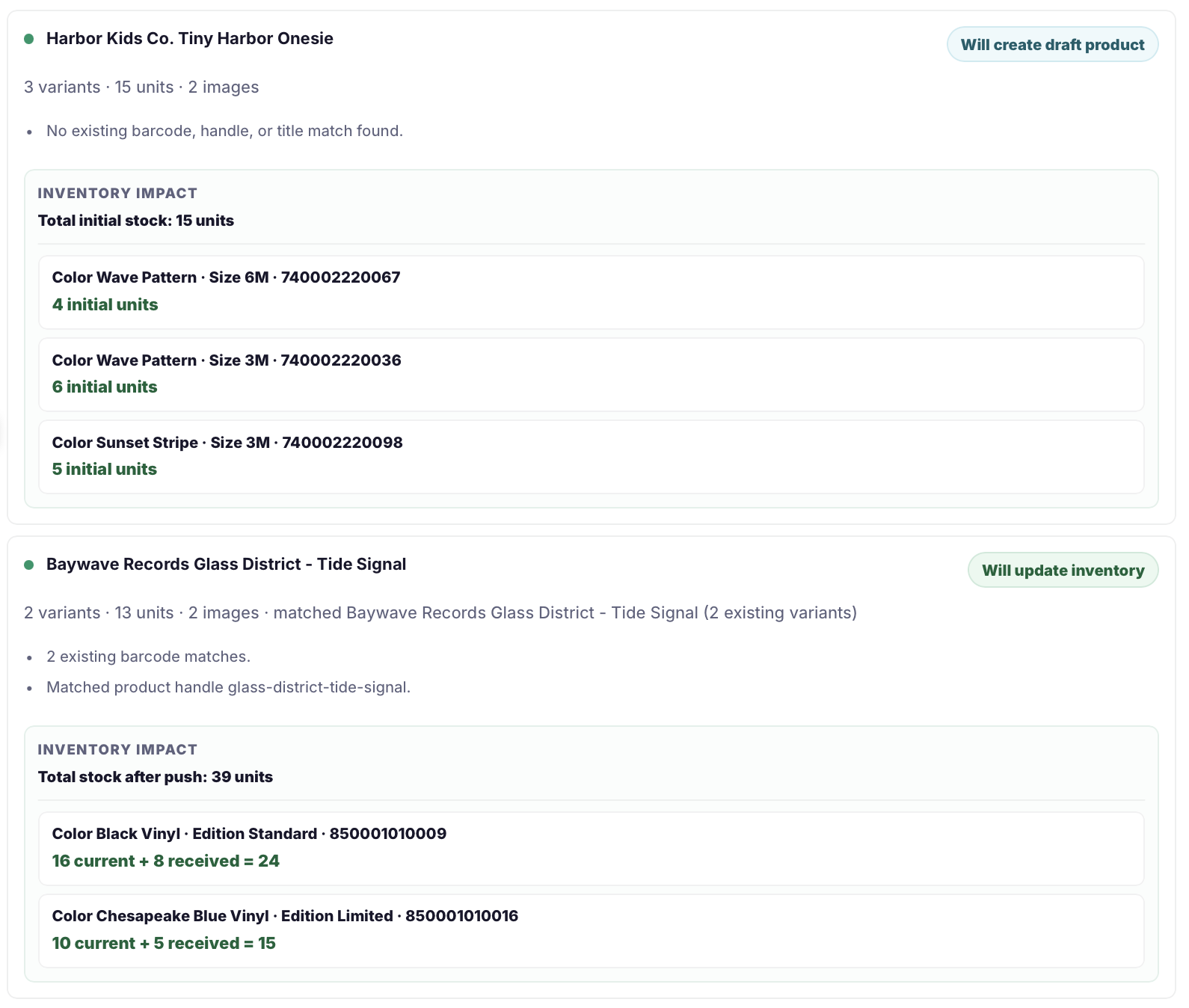
  • Existing variants show current stock plus received quantity after push.

What Catalog Intake normalized

Reformat supplier data into Shopify decisions, not another spreadsheet.

Shopify's native CSV import expects a Shopify-formatted file. Vendor CSVs often reflect how a supplier sells and ships, not how a Shopify catalog should be structured. Catalog Intake sits before the push step, cleaning up supplier files into review-ready rows so merchants can approve the right catalog action instead of rebuilding the CSV by hand.

Cleanup shown in this CSV

  • Mapped supplier-specific columns into product, variant, barcode, price, image, and inventory fields.
  • Collapsed inconsistent title patterns into Shopify-ready product groups.
  • Turned color, size or format, and edition values into variant options.
  • Validated UPC/EAN values and surfaced the invalid barcode before approval.
  • Matched existing Shopify variants by barcode to avoid duplicate products.
  • Treated received quantities as additive inventory updates during push.

Push result

Drafts created. Existing inventory updated.

After approval, the batch pushed 14 rows with 0 needing attention. New products were created as drafts, and matched existing variants show current stock plus received units.

Catalog Intake inventory impact screen showing initial stock for drafts and current plus received inventory for existing variants.

FAQ

Vendor CSV import questions

Can I clean up a CSV for Shopify import without rebuilding it?

Yes. Catalog Intake is designed for messy supplier CSVs that are not already in Shopify's native import format. Upload the vendor file as-is, review the normalized product groups and variants, then push approved rows to Shopify as draft or active products.

Does Catalog Intake reformat supplier CSVs into Shopify products?

Catalog Intake reformats supplier data into reviewed Shopify changes. It maps vendor columns into product titles, handles, variants, SKUs, barcodes, prices, quantities, images, and inventory actions so merchants do not have to rebuild the CSV by hand.

Is this the same as Shopify's native CSV importer?

No. Shopify's CSV importer is useful when the file already matches Shopify's required CSV format. Catalog Intake is built for vendor CSVs and spreadsheets that need interpretation, grouping, review, and cleanup before they become Shopify products or inventory updates.

Can Catalog Intake import any CSV?

Catalog Intake works best when the CSV includes product names and at least one useful identifier such as SKU, barcode, UPC, style number, or vendor reference. File quality still matters, so rows are sent to review before pushing.

Can CSV rows update inventory instead of creating duplicates?

Yes. When an approved row matches an existing Shopify variant by barcode, Catalog Intake can update inventory instead of creating a duplicate product.

Can CSV imports create active products?

Yes. Draft product creation is the default. When active product mode is enabled, merchants can publish approved products to selected Shopify sales channels.

Upload the messy vendor CSV first. Decide what becomes a Shopify product after review.

Install Catalog Intake from Shopify, upload a supplier CSV or spreadsheet, review the extracted rows, then push approved draft products, active products, or inventory updates when the batch is ready.