Catalog Intake vs Matrixify

Catalog Intake vs Matrixify: choose the right Shopify import workflow

Matrixify is a mature Shopify import, export, migration, and bulk data tool when your data is already structured. Catalog Intake is built for the messy work before that point: supplier PDFs, packing slips, invoices, CSVs, Excel files, product sheets, and shipment photos that still need extraction, variant grouping, barcode review, image matching, and merchant approval before anything reaches Shopify.

Workflow

How to decide

Most merchants do not have an import problem first. They have an intake problem: the supplier source is incomplete, inconsistent, image-heavy, or not built for Shopify.

1. Look at the file you actually receive

If the source is a polished spreadsheet with Shopify-compatible columns, a structured import/export app may be enough. If it is a vendor file, PDF, invoice, packing slip, product sheet, or photo, Catalog Intake is designed for that first messy step.
2. Decide whether review is the core workflow

Catalog Intake keeps extraction, product grouping, barcode matches, image suggestions, pricing evidence, warnings, draft creation, and inventory updates visible before push.

3. Push only after the merchant approves

Approved rows can become draft products, selected active products, or barcode-matched inventory updates. Unclear rows stay in review instead of becoming catalog cleanup later.

Example

Example: supplier packing slip vs clean spreadsheet

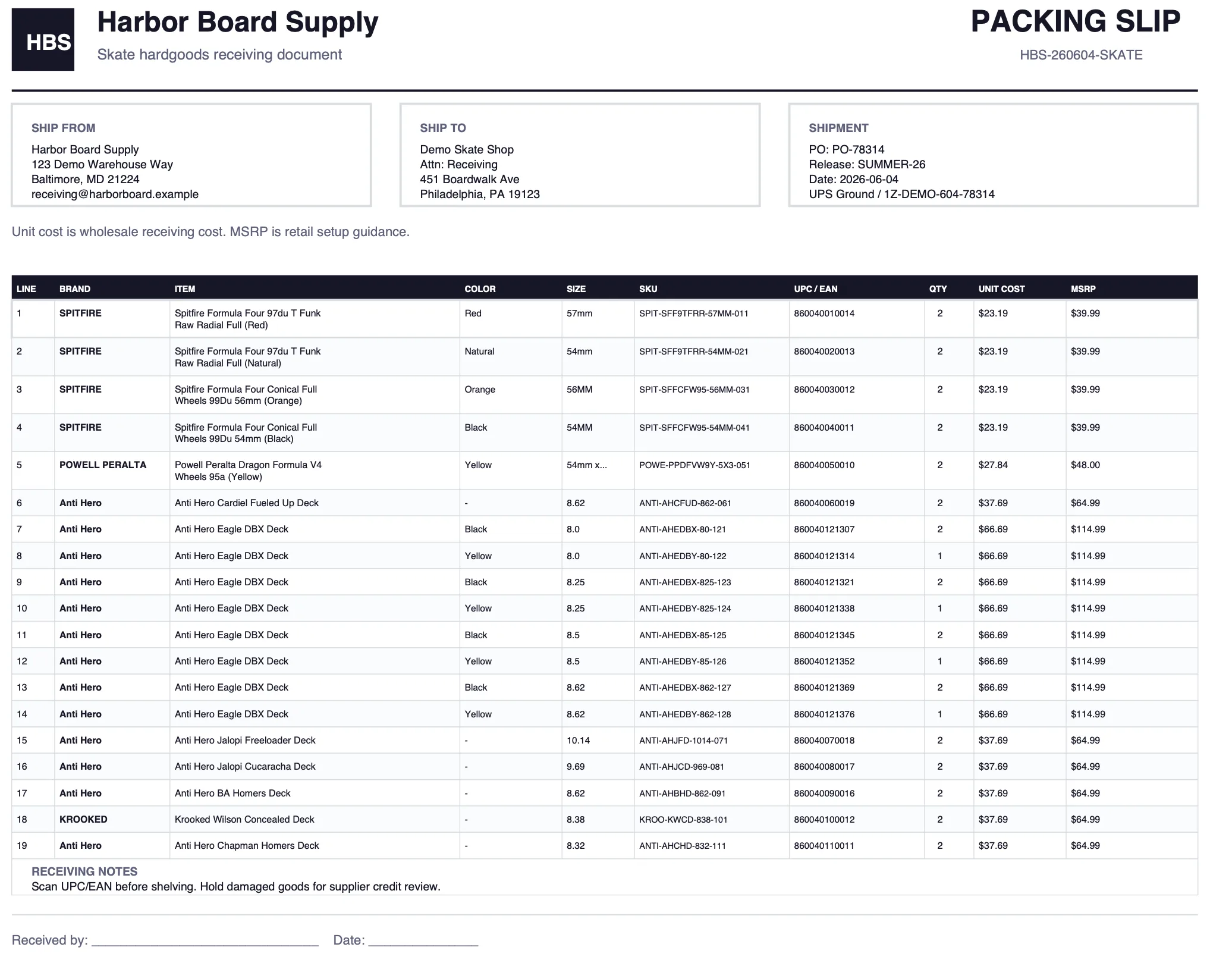
A clean Shopify product spreadsheet is a data movement job. A supplier packing slip with quantities, UPCs, unit costs, product names, sizes, missing retail prices, and no Shopify handles is a catalog intake job. Catalog Intake reads the source, prepares reviewed Shopify product groups or inventory updates, and makes the merchant approve the batch before push.

Proof

Where Catalog Intake is intentionally different

The positioning is not that every store should replace its import/export app. It is that supplier intake is a different job than moving already-structured Shopify data.

Supplier packing slip used as a source file before Shopify product review.

Supplier source first

Start from supplier files merchants already receive: PDFs, CSVs, Excel files, invoices, packing slips, product sheets, and shipment photos.

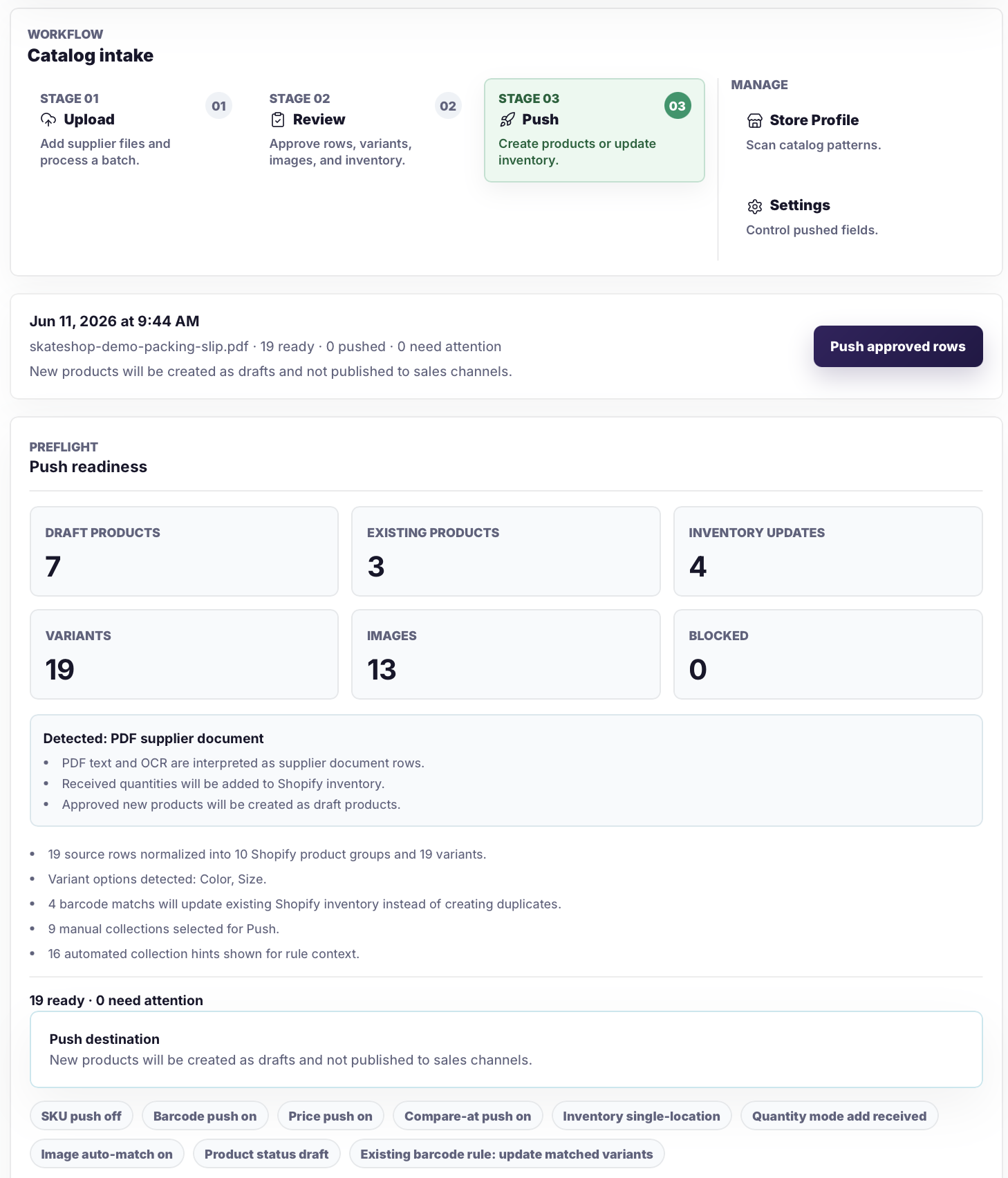
Catalog Intake push readiness screen showing draft products, existing products, inventory updates, variants, images, and blocked rows.

Review-first batch

Catalog Intake shows draft products, existing products, inventory updates, variants, images, blocked rows, and push settings before Shopify receives changes.

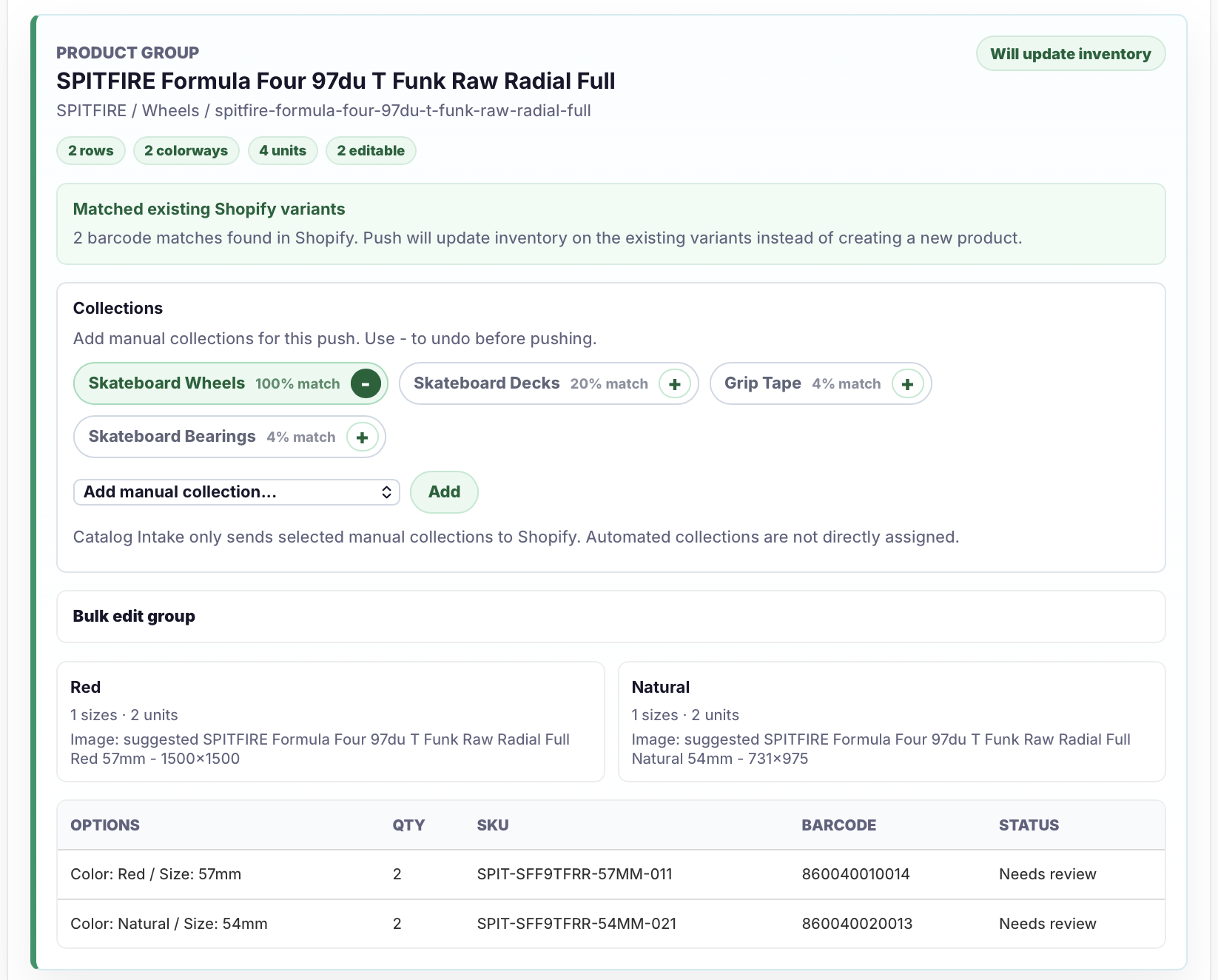
Catalog Intake review screen showing barcode-matched inventory updates.

Barcode inventory review

Existing Shopify variants can be matched by barcode so received quantities update inventory instead of creating duplicate products.

Safeguards

A fair comparison

This page should help merchants choose correctly. It should not pretend one product solves every Shopify data workflow.

  • Matrixify is a strong fit for broad Shopify import, export, migration, and structured data workflows.
  • Catalog Intake is a strong fit when the source file still needs interpretation, extraction, review, and approval.
  • Catalog Intake does not replace every import/export workflow.
  • Catalog Intake is not meant to push uncertain supplier data straight to Shopify without review.
  • The right question is not which app has more data operations. It is whether the merchant needs structured data movement or messy supplier-file intake.

FAQ

Common questions

Is Catalog Intake a Matrixify replacement?

Not for every workflow. Matrixify is a broad import, export, migration, and structured data app. Catalog Intake is focused on supplier-file intake, extraction, review, draft product creation, barcode inventory matching, and image matching before push.

When should a merchant use Catalog Intake instead?

Use Catalog Intake when the source is a supplier PDF, invoice, packing slip, photo, product sheet, or messy CSV that still needs product extraction, variant grouping, barcode review, image matching, pricing safeguards, and merchant approval.

Can the tools be used together?

Yes. A merchant can use Catalog Intake for messy supplier intake and still use a structured data tool for other import, export, reporting, or migration workflows.

Use Catalog Intake when the source file is still messy

If your team is rebuilding supplier files by hand before importing to Shopify, start with Catalog Intake and review the prepared batch before push.