Best Shopify app for supplier product imports

The best Shopify supplier import app depends on the file you receive

If your supplier already sends clean Shopify-ready CSVs, a bulk import tool may be enough. If your team receives PDFs, packing slips, invoices, Excel sheets, vendor CSVs, product sheets, or shipment photos that still need product extraction, variant grouping, barcode matching, image review, pricing safeguards, and approval before push, Catalog Intake is built for that supplier intake workflow.

Workflow

How to choose the right Shopify supplier import app

Most app comparisons skip the real question: is the supplier file already clean data, or is it still messy source material that needs merchant review?

1. Check whether the supplier file is Shopify-ready

If the file already has clean Shopify columns, handles, variants, SKUs, barcodes, images, and prices, a structured import tool can work. If the file is supplier paperwork, Catalog Intake is designed for the earlier intake step.

2. Decide whether review must happen before import

Catalog Intake keeps product groups, variants, barcode matches, image suggestions, pricing evidence, inventory quantities, tags, and warnings visible before Shopify is changed.

3. Push only the approved outcome

Approved rows can create draft products, publish selected active products, or update existing inventory by barcode. Rows with missing data or weak evidence stay in review.

Example

Example: when Catalog Intake is the better fit

A supplier sends a packing slip with 42 received items, UPCs, SKUs, unit costs, MSRP, size or color details, and several products not yet in Shopify. That is not a simple CSV import. Catalog Intake extracts the rows, groups variants, separates cost from retail evidence, identifies existing barcode matches, suggests images where possible, and lets the merchant approve the batch before push.

Proof

What a supplier import app should prove

For supplier imports, the app should show how it handles the messy middle between vendor source files and Shopify catalog changes.

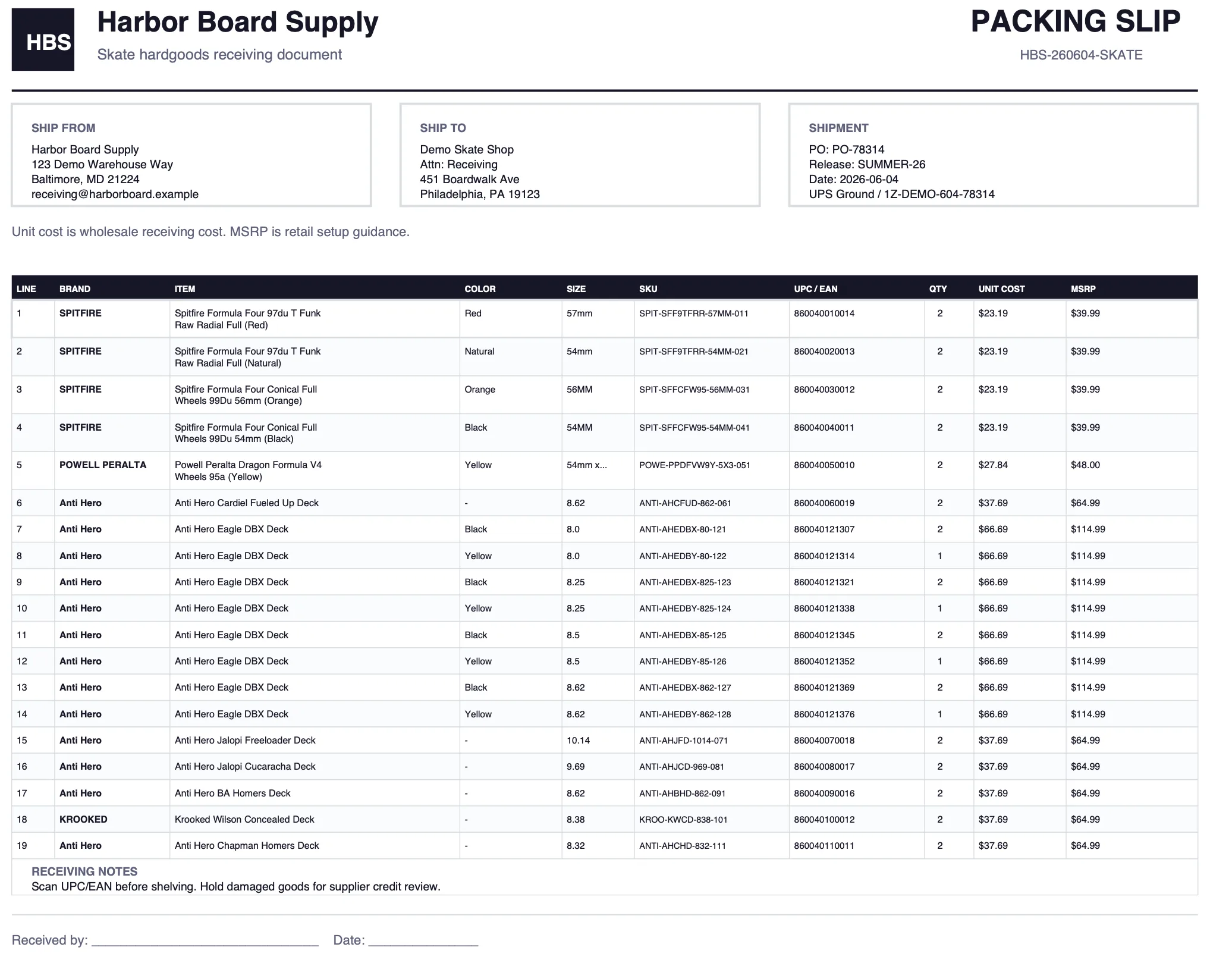
Supplier packing slip source file before Shopify product import.

Source file support

Catalog Intake starts with the kinds of files merchants actually receive: packing slips, PDFs, invoices, spreadsheets, and photos.

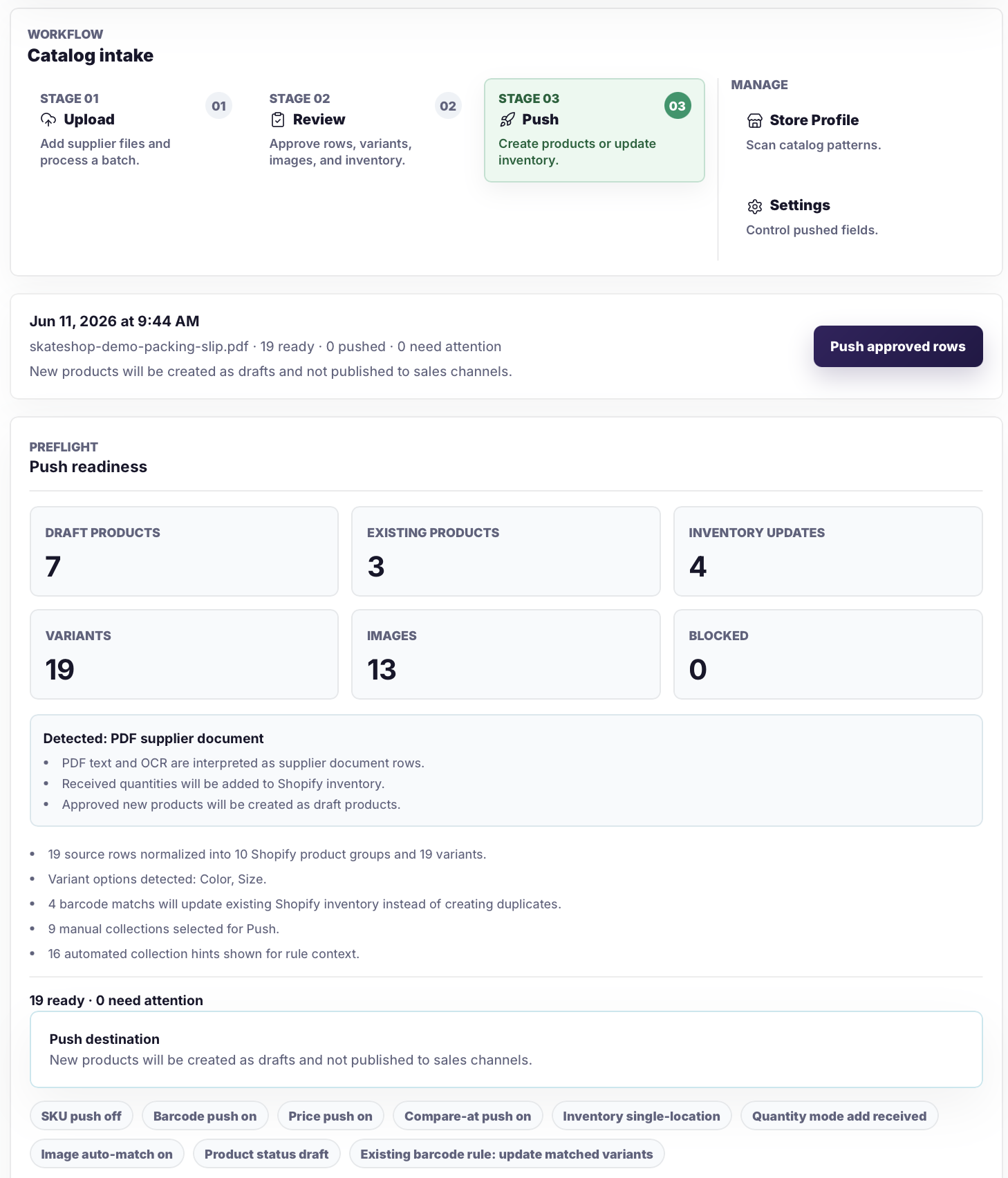
Catalog Intake push readiness screen showing reviewed Shopify import outcomes.

Review before push

The push readiness screen summarizes drafts, existing products, inventory updates, variants, images, and blocked rows before Shopify changes.

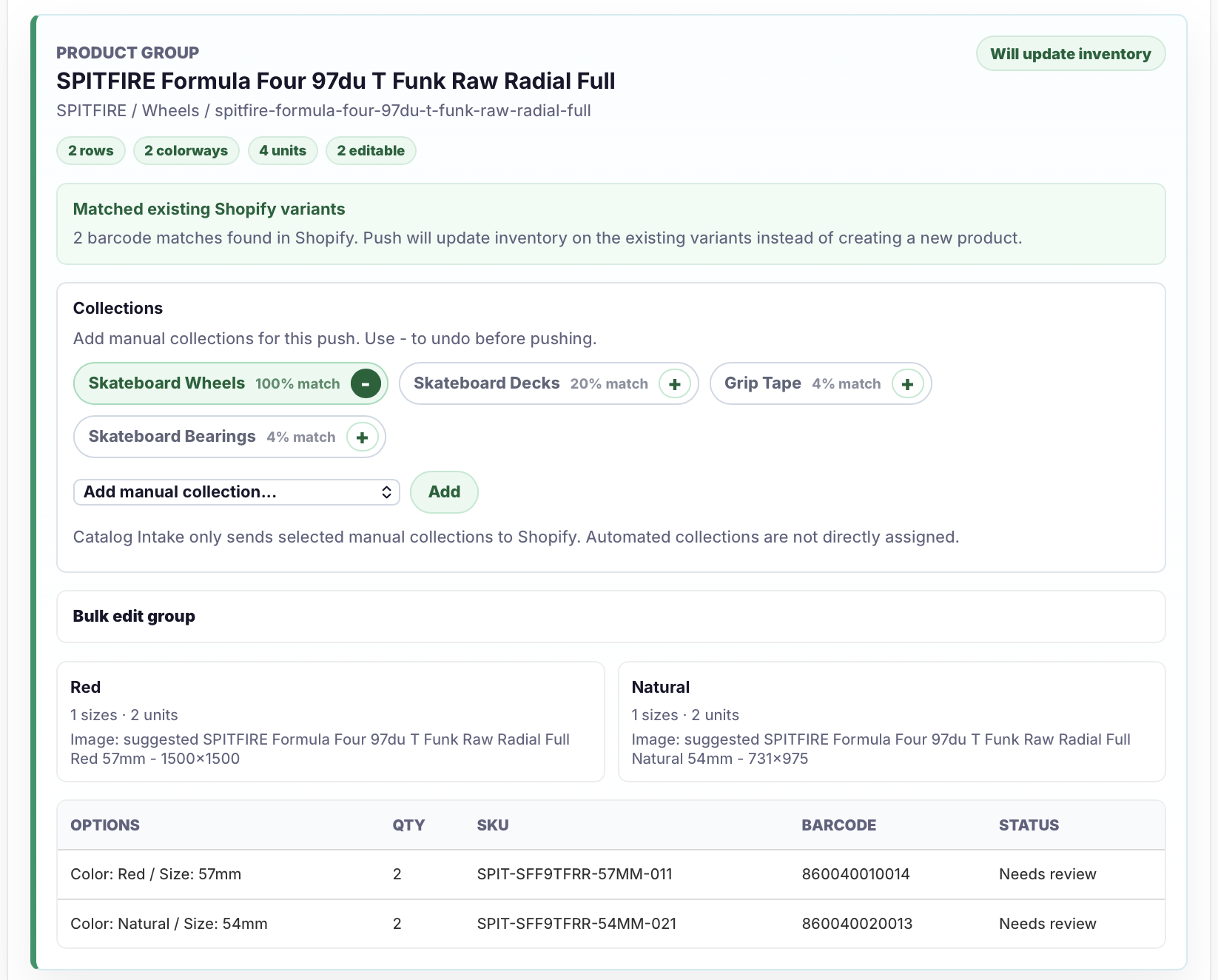
Catalog Intake barcode matching review screen before inventory updates.

Barcode inventory matching

Existing Shopify variants can be matched by barcode so received quantities update inventory instead of creating duplicate products.

Safeguards

What to avoid when choosing

The wrong tool can make supplier imports look faster while pushing cleanup into your Shopify catalog.

  • Do not treat invoice cost as storefront retail price unless retail evidence is clear.
  • Do not create duplicate products when a row matches an existing Shopify variant by barcode or SKU.
  • Do not push rows with missing identifiers, unclear variants, or weak image matches without review.
  • Do not choose a structured import tool if the real work is extracting and cleaning supplier source files first.
  • Do not make staff rebuild the same supplier files by hand every receiving cycle.

FAQ

Common questions

What is the best Shopify app for supplier product imports?

For clean Shopify-ready spreadsheets, a structured import app may be enough. For supplier PDFs, packing slips, invoices, messy CSVs, Excel files, product sheets, and photos that need extraction and review, Catalog Intake is built for the supplier intake workflow.

Is Catalog Intake only for CSV imports?

No. Catalog Intake supports supplier CSVs, Excel files, PDFs, invoices, packing slips, product sheets, line sheets, and readable product or shipment photos.

Can Catalog Intake update inventory for existing products?

Yes. Rows that match existing Shopify variants by barcode, UPC, EAN, or SKU can be reviewed as inventory updates instead of duplicate product drafts.

Does Catalog Intake push changes automatically?

No. Catalog Intake is review-first. Merchants approve prepared products, variants, prices, images, tags, barcodes, and inventory actions before push.
Use Catalog Intake when supplier files are not Shopify-ready

Upload the supplier source, review the prepared products and inventory matches, then push only the Shopify changes your team approves.